Electronics kits · Ages 14-18
Best Electronics Starter Kits for High Schoolers (2026): Arduino Kits Ranked by Real Value
Electronics starter kits for high schoolers ranked by real value, budget UNO to WiFi/IoT, with honest component counts, owner complaints, and one kit to skip.
Published Jun 20, 2026 · 10 min read
As an Amazon Associate, I earn from qualifying purchases. Your price stays the same.
TL;DR
- Budget pick: ELEGOO UNO R3 Super Starter Kit (~$45). 200+ components, 24-lesson tutorial, no-solder start. The right first kit for most high schoolers.
- Most I/O pins: ELEGOO Mega 2560 Starter Kit (~$66). 54 I/O pins, 256 KB Flash, 35 lessons. The logical step-up when the UNO starts to feel limiting.
- WiFi/IoT pick: Freenove Ultimate Starter Kit V5 WiFi (~$65–70). The only kit here with onboard ESP32-S3 WiFi, no add-on module needed.
- Best tutorial pick: Freenove Ultimate Starter Kit V4 (~$45–50). 217 items, 51 projects, a 274-page PDF tutorial that self-directed learners consistently single out.
- One to skip: Arduino Official Starter Kit K000007 (~$75–90). Roughly 60 components at up to double the price. Built for classrooms, not bedrooms.
As an Amazon Associate, I earn from qualifying purchases made through product links in this review. This does not affect the price you pay. This guide is based on manufacturer specs, published expert reviews, and patterns from verified-buyer feedback, not personal hands-on testing.
A high schooler says they want to learn electronics, and the search results return a wall of Arduino kits with nearly identical names and wildly different prices. Some have 200+ components; some have 44. The kits that look cheapest often produce the most frustration; the most expensive one is the one most experts agree to skip. This guide draws on manufacturer specs, published expert roundups from ElectronicsHub and How to Mechatronics, and verified-buyer feedback patterns, not personal bench testing.
How the kits compare at a glance
| Kit | Price | Components / Projects | Board | WiFi | Best for |
|---|---|---|---|---|---|
| ELEGOO UNO R3 | ~$45 | 200+ / 24 lessons | UNO R3 (ATmega328P) | No | First-time learner, budget |
| ELEGOO Mega 2560 | ~$66 | 200+ / 35 lessons | Mega 2560 (ATmega2560) | No | Step-up, more I/O pins |
| Freenove V4 | ~$45–50 | 217 items / 51 projects | Board V4 (Arduino IDE) | No | Self-directed, deep tutorial |
| Freenove V5 WiFi | ~$65–70 | 220 items / 78 projects | Board V5 (ESP32-S3) | Yes (onboard) | IoT + connected projects |
| SunFounder 3-in-1 | ~$55–65 | 192 items / 87 projects | UNO R3-compatible | No | Video-first learner |
| Arduino K000007 | ~$75–90 | ~60 / 15 projects | Official UNO R3 | No | Schools / institutions only |
The price-per-component math is worth doing once: the ELEGOO UNO R3 delivers 200+ components at around $45, roughly $0.22 per component. The official Arduino kit delivers about 60 components at up to $90, closer to $1.50 per component. The chip inside both boards is the same ATmega328P. That gap sets the tone for everything below.
Best entry-level pick: ELEGOO UNO R3 Super Starter Kit
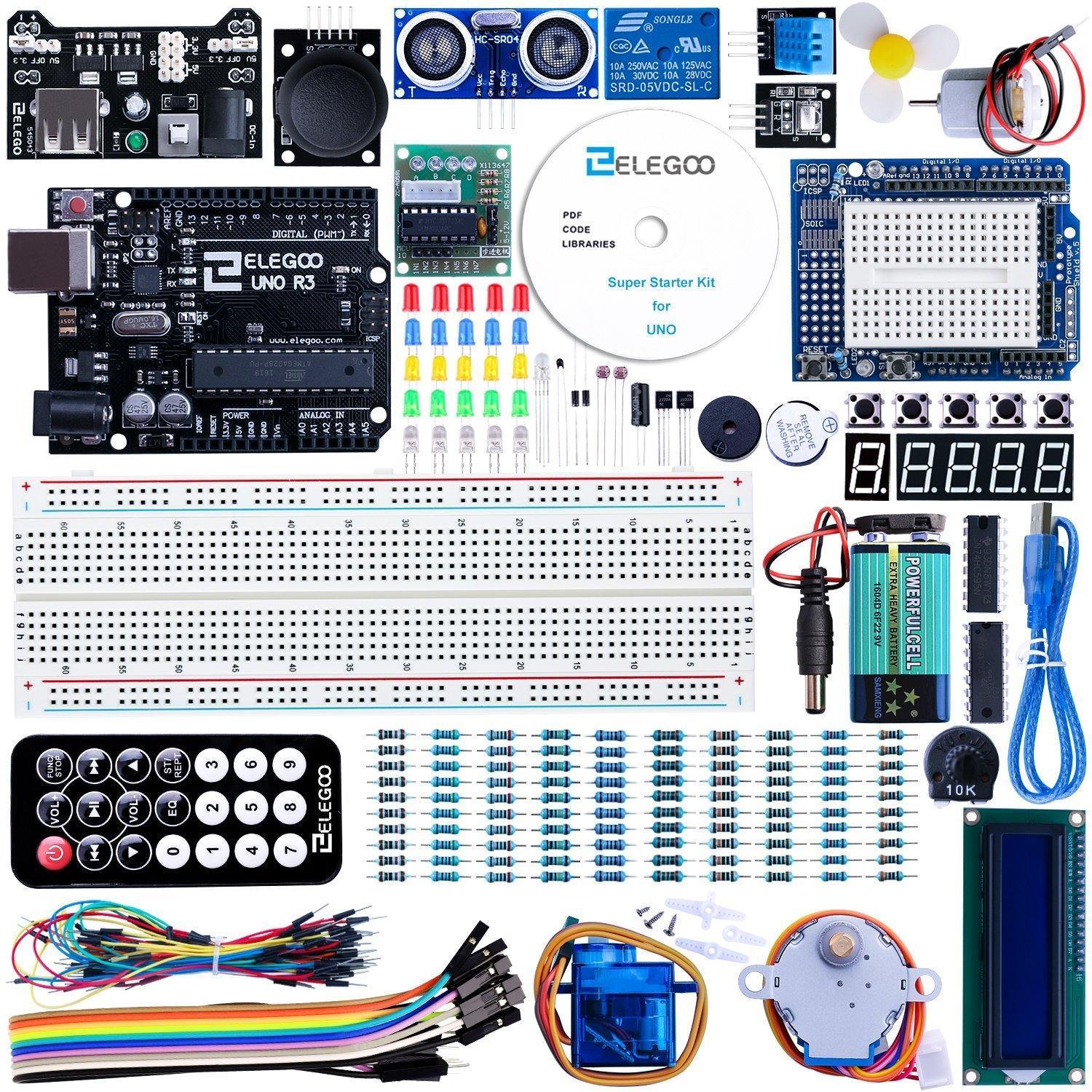
The ELEGOO UNO R3 is the clearest recommendation for a high schooler picking up their first kit. At around $45, it ships with 200+ components, resistors, LEDs, an LCD1602 display module, servo, stepper motor driver, and temperature sensor, plus a 24-lesson tutorial written for true beginners. The LCD1602 arrives pre-assembled. No soldering required for any lesson. The UNO R3 board itself runs an ATmega328P at 16 MHz with 32 KB of Flash, 2 KB of SRAM, and 14 digital I/O pins at 5V. That is modest next to the Mega below, but plenty for a first year of projects.
Verified-buyer reviews on Amazon center on value density: "high-quality components," "excellent value," "pre-assembled LCD saves time." The recurring complaint is component durability at the margins: a small share of owners mention LEDs that fail early or a battery box that shorts. Neither issue is widespread.
Who it's for: Any high schooler who has never touched a microcontroller, anyone on a tighter budget (see also circuit kits under $50 for beginners), and anyone who wants to start building without a research project first. Not the pick if the first project requires WiFi or if 14 I/O pins feel limiting from the start.
For full specs, see the ELEGOO UNO R3 Super Starter Kit product page.
Most I/O pins: ELEGOO Mega 2560 Starter Kit
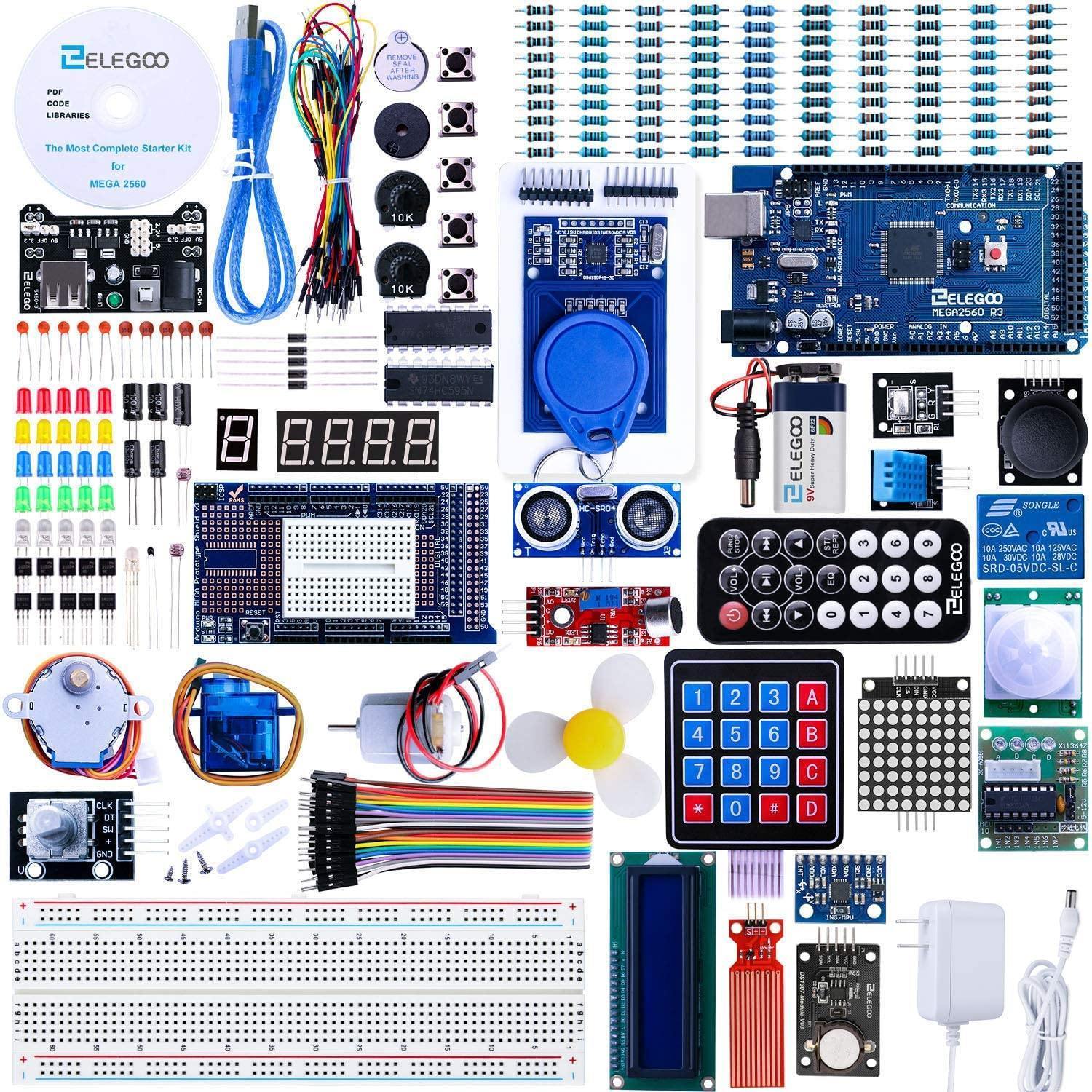
The Mega 2560 is a second kit, not a first one. At around $66, it upgrades from 14 digital I/O pins to 54 and bumps memory to 256 KB of Flash (vs 32 KB on the UNO) and 8 KB of SRAM (vs 2 KB). Lessons extend to 35, and the kit adds a GY-521 gyroscope/accelerometer. Components ship in a compartmentalized storage case, which owners appreciate when hunting a specific resistor months later.
When a project outgrows the UNO (more sensors, more actuators, more modules running simultaneously) the Mega removes the bottleneck without switching platforms.
Buyer feedback tracks the UNO's themes: "comprehensive for learners," "great step up," "everything organized in the box." The main complaint: tutorials don't clearly explain why the extra pins matter, which leaves some first-time buyers uncertain what to build next.
Who it's for: Teens who have already finished an entry-level kit and want to build multi-sensor projects or run multiple actuators in parallel. Skip it if this is a first kit; the UNO is a better introduction and the extra cost is wasted before lesson one.
Best tutorial depth (offline): Freenove Ultimate Starter Kit V4
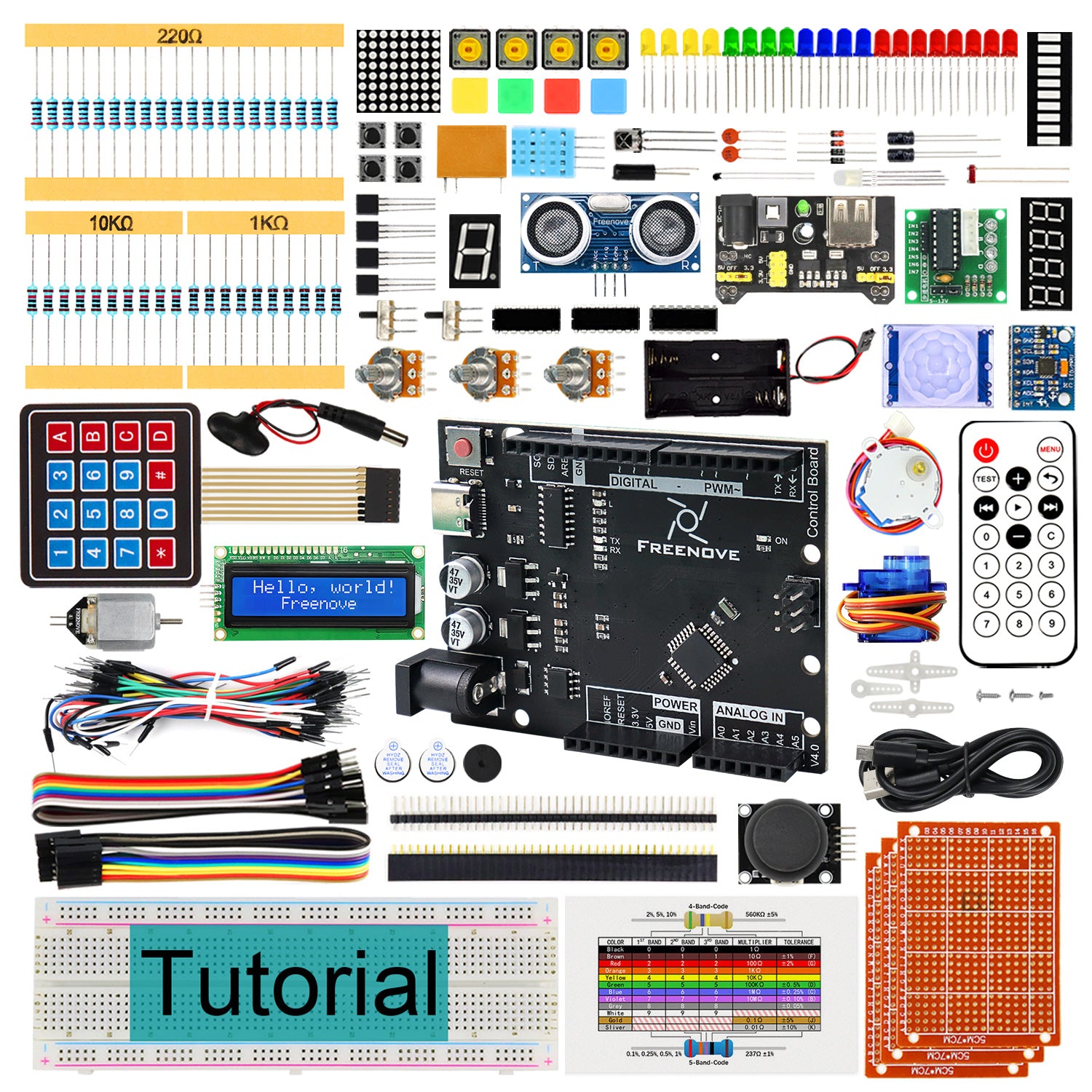
If a high schooler will actually read documentation, the Freenove V4 is the strongest offline kit at around $45–50. It ships with 217 components, 51 guided projects, and a 274-page PDF tutorial, more depth than the UNO at the same price. The board is USB-C and fully Arduino IDE-compatible, so every third-party library works without modification. The 274-page arc runs from LED output through sensing and actuator control, which rewards self-directed teens who work through it over several weeks.
Verified-buyer feedback is consistently strong on tutorial quality: "comprehensive tutorial is the standout," "excellent for self-learners." Main downside: PDF-only delivery, no physical booklet. A small number of buyers report a dead-on-arrival board, uncommon but worth checking on delivery. Freenove's customer service is generally cited as responsive on DOA replacements.
Who it's for: Self-directed learners who prefer written documentation and anyone who wants more projects than the UNO at the same price. Skip it if the first goal is WiFi (get the V5) or if a physical printed booklet is a requirement.
See the Freenove V4 product page for the full component and tutorial breakdown.
WiFi and IoT upgrade: Freenove Ultimate Starter Kit V5 WiFi
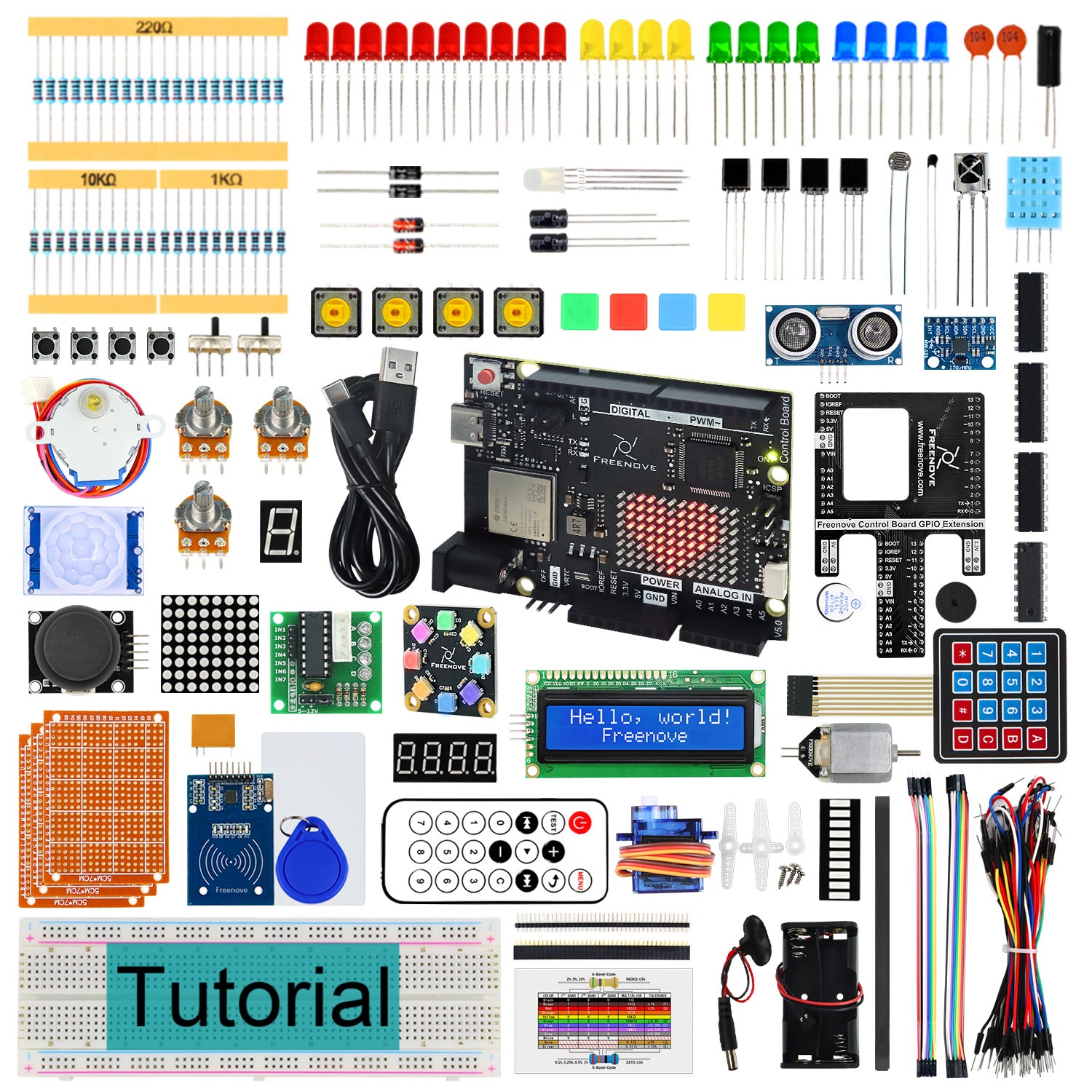
The Freenove V5 is the only kit in this guide with onboard WiFi, and that is its entire argument. At around $65–70, it adds an onboard ESP32-S3 (WiFi + Bluetooth) to the V4's foundation, expanding to 78 projects across a 399-page tutorial. Every other kit here requires a separate ESP8266 or ESP32 breakout to enable WiFi: extra cost, extra setup, not covered in the official tutorial. The V5 removes that friction entirely for learners whose projects involve sending sensor data to a dashboard or controlling hardware remotely.
Buyer feedback is positive: "V5 WiFi board is a real upgrade," "excellent for IoT self-learners." Complaints mirror the V4's: PDF-only tutorials, and the V5's added cost is unnecessary for learners without an IoT goal.
Who it's for: A high schooler who wants to build connected devices: a weather station, a sensor that reports to a phone, any project requiring network access. Skip it if projects are purely offline: the V4 saves $15–20 and covers the same ground.
If you are deciding between Arduino and a full Linux computer, see Arduino vs Raspberry Pi for teen electronics projects for the platform comparison, or Raspberry Pi starter kits for teens if a single-board computer is the actual goal.
Video-driven learning: SunFounder 3-in-1 Ultimate Starter Kit
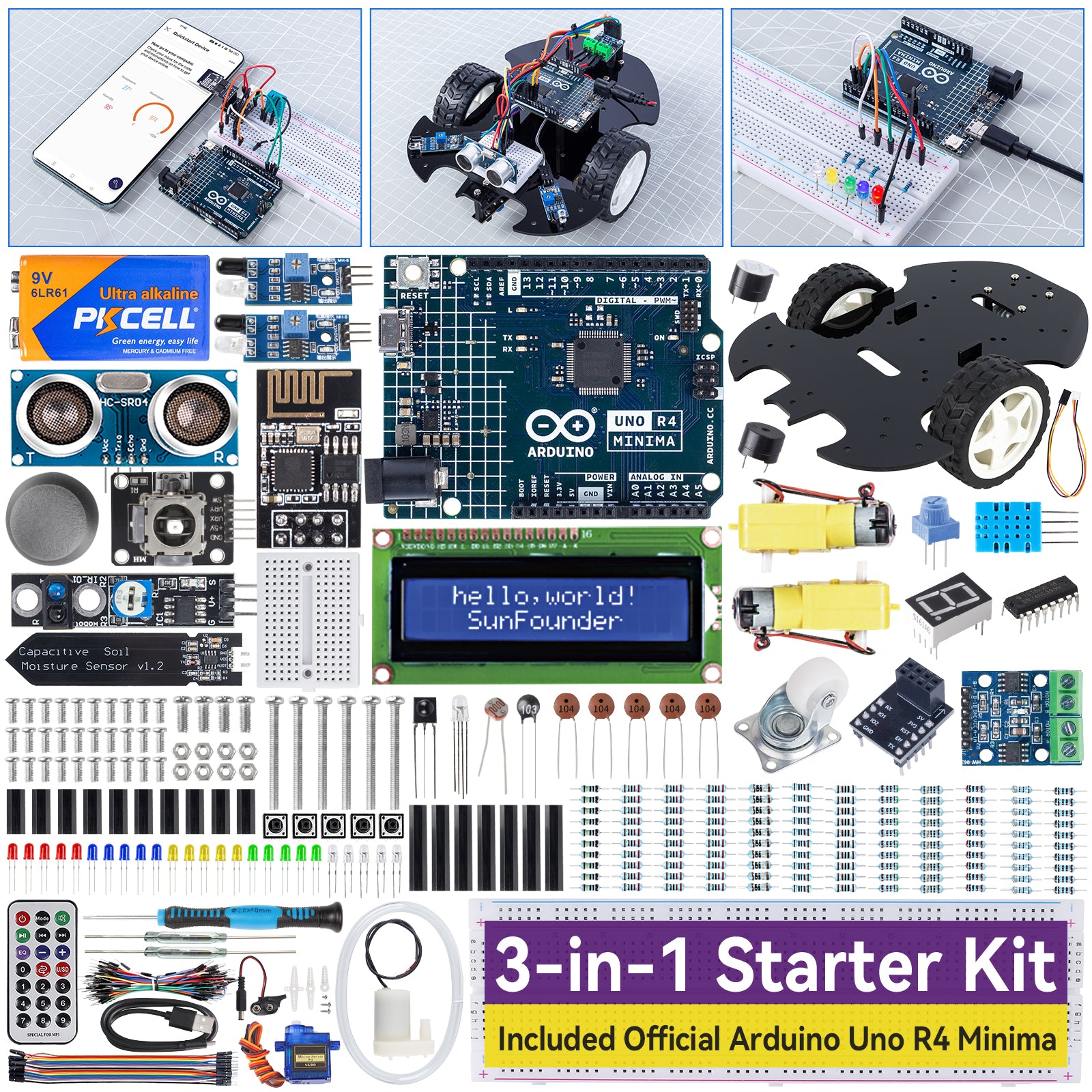
SunFounder's 3-in-1 Ultimate is the pick for a high schooler who learns best from watching, not reading. At around $55–65, it ships with 192 components and 87 guided projects across three tiers: basic electronics, sensor and display modules, and a smart car build. The video course is the differentiating feature, produced to a higher standard than the PDFs most competitors ship. That project count is the highest in this roundup, though more projects does not automatically produce deeper understanding. SunFounder delivers broad exposure across many project types, which suits a visual learner who wants to see a wide variety of builds before going deep.
Verified-buyer feedback: buyers consistently praise the video course depth. Recurring complaints include pricing confusion between the UNO R3 and Uno R4 Minima variants and occasional loose or damaged modules on arrival.
Who it's for: Visual learners who stall on written steps and teens who want the widest project variety to find what interests them. Skip it if you need WiFi out of the box, or prefer a single deep tutorial over a broad library.
See the SunFounder 3-in-1 product page for current variant details.
The one to skip: Arduino's official Starter Kit (K000007)
For a high schooler learning at home, skip the official Arduino Starter Kit K000007. At $75–90, it ships with approximately 60 components and 15 curated projects in a printed book. That book is genuinely well-made: clear instructions, good photography, Arduino's official voice. The board is authentic hardware, not a clone.
None of that justifies the price gap for individual learners. At the same budget, the UNO kit delivers 200+ components and 24 lessons; Freenove's V4 delivers 217 components and 51 projects. The Arduino kit's 60 components at $75–90 represent roughly 2.5x the cost-per-component of the UNO kit, with fewer projects. The "official" chip, an ATmega328P, is the same one on every UNO-compatible board in this guide.
Who it IS for: Schools and institutions that require authentic Arduino branding for curriculum compliance, or teachers buying classroom bulk packs where a printed book and consistent hardware matter for a cohort. The official Arduino classroom pack is the right context. For a single high schooler at home, the money is better spent elsewhere.
Which kit should you buy?
-
First kit, budget: UNO R3 kit (~$45). Proven beginner path, 200+ components, tutorial that finishes.
-
First kit, self-directed: Freenove V4 (~$45–50). Same price, more projects, deeper tutorial.
-
Want WiFi from day one: Freenove V5 (~$65–70). Onboard ESP32-S3: don't buy a different kit and add a module later.
-
Step-up with more I/O: ELEGOO Mega 2560 (~$66). 54 pins, 256 KB Flash. A second kit, not a first.
-
Visual learner: SunFounder 3-in-1 (~$55–65). Best video course in this tier.
-
School or classroom: Arduino K000007 (~$75–90). The only context where the premium is justified.
If you are deciding whether Arduino is even the right platform, the micro:bit vs Arduino guide for 12-year-olds and the Arduino vs Raspberry Pi comparison address that fork directly.
What comes after the starter kit?
Finishing a starter kit's tutorial arc is the beginning, not the end.
Learn soldering. Every breadboard kit eventually hits its ceiling. When a project needs to be permanent or portable, the next step is a soldering iron. Our soldering kits for teen makers guide covers what to buy and what to practice on first.
Pick a real project before opening the box. The most common reason a starter kit ends up on a shelf: the teen finished lesson 12 with no personal project waiting. A custom LED matrix, a temperature logger, a servo-driven door lock; pick something that matters to them before day one.
Upgrade the board when you hit a limit. UNO running out of pins? Add the Mega. Need wireless? The Freenove V5 is the cleanest path. Need more raw processing power or a camera? That is when Raspberry Pi starts making sense.
The starter kit is a door, not a destination. The faster a teen moves from following a tutorial to building something they designed, the more they will get out of the hardware.
Shopping for a gift? Start here
- Best LEGO Botanicals Sets for Adult Builders and Gift-Givers (2026)
- LEGO Botanicals Bonsai Tree vs LEGO Botanicals Orchid: Which Is Better for Adult Builders and Gift Buyers?
- Holiday Gift Guide 2026: The Best Toys by Age and Budget, From Preschool to Grown-Ups
- Gifts for Grown-Ups Who Still Love Toys: LEGO, Board Games and Puzzles (2026)
How we research: This guide is based on manufacturer specifications, published independent reviews, and verified-buyer feedback, not hands-on testing.
Holiday gift guide drops every Friday in Q4
One email a week with the newest review and the toys our community is actually buying. No spam, unsubscribe anytime.