Coding toys · Ages 13-18
Best Raspberry Pi Starter Kits for Teens (2026) + First Projects to Build
The top Raspberry Pi starter kits for teens, ranked by use case, plus real first projects (retro gaming, Pi-hole, weather station) from the official docs.
Published Jun 19, 2026 · 9 min read
As an Amazon Associate, I earn from qualifying purchases. Your price stays the same.
TL;DR
- Best overall: the CanaKit Raspberry Pi 5 Starter Kit PRO (8GB). Board, 128GB microSD, active cooling, and power in one box, ~$160. Boots into a working computer day one.
- Top budget pick (with projects): the Freenove Ultimate Starter Kit (~$50). It has 223 items, 128 projects, and a 962-page tutorial. But it's components only. The Amazon listing says "Raspberry Pi NOT included."
- Official pick: the official Raspberry Pi 5 Desktop Kit (8GB ~$235). It adds an official keyboard, mouse, and Beginner's Guide for the cleanest first-computer setup.
- Same goal, different boxes. Want a working computer? Get an all-in-one. Want to learn electronics? Add the Freenove kit to a board.
As an Amazon Associate, I earn from qualifying purchases made through product links in this review. This does not affect the price you pay. This guide is based on manufacturer specs, the official Raspberry Pi documentation, and published reviews, not a personal hands-on test.
A teen says they want to "get into Raspberry Pi," and a parent opens Amazon to a wall of look-alike boxes. They're all called some version of a Raspberry Pi starter kit. Some include the computer. Some are just a bag of wires. The right Raspberry Pi starter kit for a teen depends on what they want to build first. A retro game console is a different purchase than a sensor-wiring electronics lab. I went through the manufacturer specs and the official Raspberry Pi docs to sort the strong kits from the traps.
Which Raspberry Pi board should the kit have?
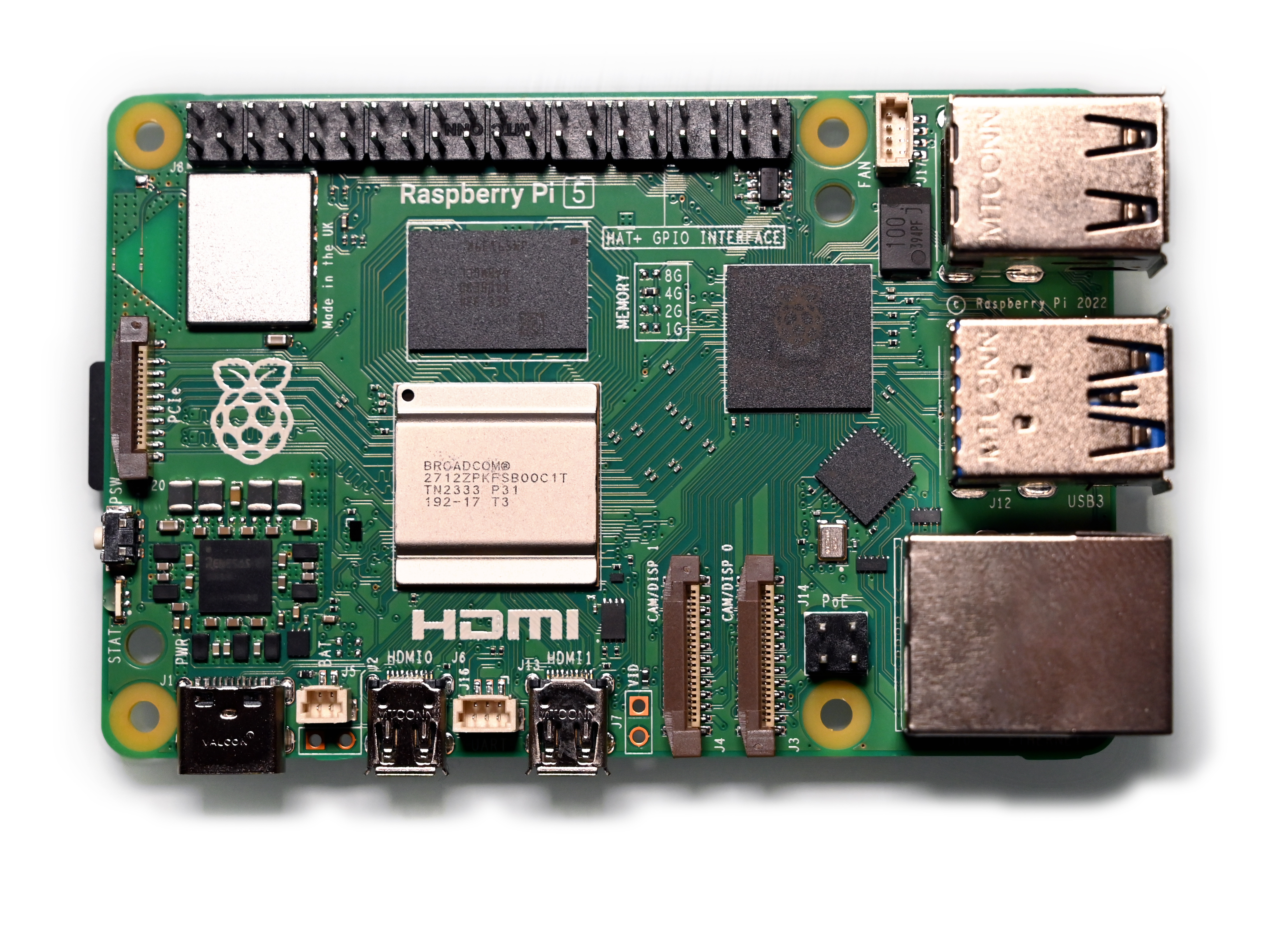
Get a kit built around the Raspberry Pi 5 with 8GB of RAM. The Pi 5 carries a Broadcom BCM2712 2.4GHz quad-core 64-bit Arm Cortex-A76 CPU, two USB 3.0 ports, Gigabit Ethernet, dual-band Wi-Fi, and Bluetooth 5.0. That's fast enough to act as a real desktop, not just a hobby board. It comes in 1GB, 2GB, 4GB, 8GB, and 16GB. For a teen who'll run a few projects or use it as a computer, 8GB is the sweet spot. 4GB is fine for a single light project, and 16GB is overkill for a beginner.
One thing to know before you shop in 2026: Raspberry Pi has raised board prices twice this year. The company says a surge in LPDDR4 memory costs from "competition for memory fab capacity from the AI infrastructure roll-out" added roughly $30 to the 8GB board and $15 to the 4GB. They call it temporary. But it's why kit prices look higher than older guides claim, so check the live price before you buy.
Which all-in-one Raspberry Pi starter kit is strongest for teens?
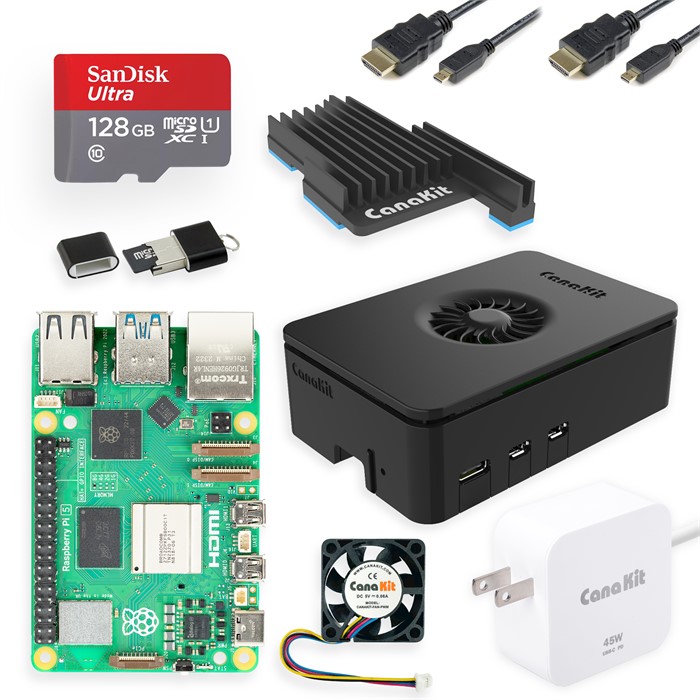
For most teens, the CanaKit Raspberry Pi 5 Starter Kit PRO with 8GB RAM is the pick. It's a true all-in-one: the Pi 5 board, a 128GB microSD pre-loaded with Raspberry Pi OS, the Turbine case, a MEGA heatsink plus a low-noise PWM fan, a USB-C PD power supply (rated up to 45W), a USB card reader, and a set of two micro-HDMI cables. Open it, add a monitor, and a teen is at a desktop in minutes. That 45W supply also leaves more headroom for bus-powered USB drives and accessories than the official kit's 27W unit, so peripherals are less likely to brown out under load.
The deciding spec here is cooling. The Pi 5 runs hot enough that an active cooler genuinely matters for sustained use, and this kit bundles both a heatsink and a fan. Owner-side, the recurring praise across retailer listings is "everything you need is in the box." The recurring gripe is price. The 8GB PRO retails around $160 and has dropped to roughly $144 on sale, which feels steep next to a bare board. That's the all-in-one tax, and for a beginner it's usually worth it. Who should skip it: a teen who already owns a Pi 5 board (you'd be paying twice for the computer).
Which budget kit wins for projects (Freenove Ultimate)?
If the goal is learning electronics, the Freenove Ultimate Starter Kit is the strongest value at around $50, but with one big asterisk. It packs 223 items, 128 projects, and a 962-page tutorial covering Python, C, Java, Scratch, and Processing: a breadboard, LEDs, resistors, sensors, motors, an LCD, and a fistful of jumper wires. For a teen who wants to wire things up rather than just run software, no all-in-one kit comes close on hands-on depth per dollar.
The asterisk is unmissable in the product's own title: "Raspberry Pi NOT Included." This is a components pack, not a computer. The recurring buyer confusion across listings is exactly this. People order it expecting a board and get a bag of parts. Who should skip it: anyone who doesn't already own (or isn't also buying) a Pi 5. Pair it with a board and it's superb. Buy it alone and it's a paperweight.
Should you buy the official Raspberry Pi 5 Desktop Kit?
For the cleanest, most "official" first-computer experience, the Raspberry Pi 5 Desktop Kit is the one to get. It's the closest thing to a finished computer. The 8GB edition (around $235) includes the Pi 5 8GB board, the official red/white case with heatsink and fan, a 27W USB-C power supply, the official keyboard and mouse, a 32GB microSD pre-loaded with Raspberry Pi OS, two 3-foot micro-HDMI cables, and the official printed Beginner's Guide.
The deciding feature is the keyboard, mouse, and Beginner's Guide. These are first-party peripherals and a real book, which a younger or less confident teen will lean on. It costs more than the PRO kit and gives you less storage (32GB vs 128GB) and no aftermarket case options. So it's a "pay for polish and official support" choice. Who should skip it: a teen who already has a spare keyboard, mouse, and monitor and would rather put the savings toward a bigger SD card or accessories. The cheaper kit gets them further for less.
How do the kits compare head-to-head?
The nuance is in the prose above; the matrix just shows where each kit lands.
| Criterion | CanaKit PRO (8GB) | Freenove Ultimate | Official Pi 5 Desktop Kit (8GB) |
|---|---|---|---|
| Pi board included | Yes (Pi 5, 8GB) | No (components only) | Yes (Pi 5, 8GB) |
| Price tier | ~$160 | ~$50 | ~$235 |
| Storage | 128GB microSD | none (use your own) | 32GB microSD |
| Active cooling | Heatsink + PWM fan | n/a | Heatsink + fan |
| Keyboard / mouse | No | No | Yes (official) |
| Best for | All-in-one desktop / projects | Hands-on electronics | Cleanest official setup |
| Components / breadboard | No | 223 items, 128 projects | No |
What jumps out: the two all-in-one kits are computers with cooling and storage. Freenove is an electronics lab that assumes you already have the computer.
What first projects should a teen build?
Pick one the official Raspberry Pi documentation walks through end to end. That way a stuck teen has a real reference, not a random blog.
- Retro game console (RetroPie). The official how-to-play-retro-games tutorial covers flashing the OS, pairing a controller, and loading game folders. It's the fastest "wow" and a great first win.
- Network-wide ad blocker (Pi-hole). The official Pi-hole tutorial and the Pi-hole project docs turn the Pi into a DNS server. It blocks ads across every device on the home network, which is real, useful networking.
- Home file server (NAS). Raspberry Pi's own build-a-NAS tutorial teaches storage, sharing, and Linux services with external drives.
- Weather station in Python. Add a Sense HAT and a teen codes temperature, humidity, and pressure readings with the official Sense HAT Python library, displaying results on its LED matrix. It's the strongest first coding project.
What if you want something simpler, or you're between two kits?
Maybe your teen isn't sure they want a full Linux computer yet. If they'd rather start with sensors and code on a microcontroller, a smaller board is the softer landing. Our Arduino vs Raspberry Pi for teen electronics projects guide weighs that exact fork, and if Arduino wins, our best electronics starter kits for high schoolers guide ranks the ELEGOO, Freenove, and SunFounder kits by real value. For a younger or first-time coder, a beginner board with built-in sensors removes a lot of friction. See Raspberry Pi Pico vs micro:bit for beginner coders and, for the under-13 crowd, micro:bit vs Arduino starter kit for 12-year-olds. And on safety: a Raspberry Pi board and the loose parts in a components kit are under 1.25 inches. The CPSC's small-parts rule (16 CFR Part 1501) treats that as a choking hazard for children under 3. Keep these kits away from toddlers and store them up high.
One kit to be wary of: very cheap, unbranded "Raspberry Pi 5 starter kits" that bundle a tiny SD card and a passive-only acrylic case with no fan. On a Pi 5 that runs hot, skipping active cooling is a false economy. Pay a little more for a kit with a heatsink and fan.
The verdict: our pick
Bottom line: For most teens, the CanaKit Raspberry Pi 5 Starter Kit PRO (8GB) is our pick (4.5/5). It's the top all-in-one Raspberry Pi 5 starter kit for a teen: board, active cooling, a pre-loaded 128GB card, and power in one box, so it boots to a desktop the day it arrives. Choose the Freenove kit instead only if they already own a board and want to learn electronics.
For a teen who wants a Raspberry Pi that works the day it arrives, get the CanaKit Raspberry Pi 5 Starter Kit PRO (8GB). The 8GB board, 128GB pre-loaded card, and active cooling mean no shopping list, no overheating, and a straight path to RetroPie, Pi-hole, or a weather station.
For a teen who already has a board (or is buying one) and wants to learn real electronics, add the Freenove Ultimate Starter Kit. You get 223 parts and 128 guided projects for around $50, the strongest hands-on value here. Just remember the board isn't in the box.
And if you want the cleanest first-party experience with a keyboard, mouse, and printed guide, the official Raspberry Pi 5 Desktop Kit is worth the premium. Whichever you choose, start with one project from the official docs. The win comes faster when the instructions actually match the hardware.
Shopping for a gift? Start here
- Best LEGO Botanicals Sets for Adult Builders and Gift-Givers (2026)
- LEGO Botanicals Bonsai Tree vs LEGO Botanicals Orchid: Which Is Better for Adult Builders and Gift Buyers?
- Holiday Gift Guide 2026: The Best Toys by Age and Budget, From Preschool to Grown-Ups
- Gifts for Grown-Ups Who Still Love Toys: LEGO, Board Games and Puzzles (2026)
How we research: This guide is based on manufacturer specifications, published independent reviews, and verified-buyer feedback, not hands-on testing.
Holiday gift guide drops every Friday in Q4
One email a week with the newest review and the toys our community is actually buying. No spam, unsubscribe anytime.