programming-toys · ages 4-6
Botley 2.0 vs Code & Go Robot Mouse: Best Screen-Free Coding Robot for Preschoolers (2026)
Two screen-free coding robots for ages 4-6, at opposite price points. A research-based comparison of Botley 2.0 and the Code & Go Robot Mouse — what each teaches, where each breaks down, and which fits your preschooler.
Published 2026-06-01 · 9 min read
Amazon Associates disclosure
As an Amazon Associate, I earn from qualifying purchases. The price you pay is the same. This guide is based on manufacturer specifications, published independent reviews, and verified-buyer feedback, not hands-on testing.
TL;DR
- Code & Go Robot Mouse (~$35-50, ages 4+): the simpler, cheaper first robot — big buttons, grid sequencing, screen-free.
- Botley 2.0 (~$80-90, ages 5+): more concepts (object detection, basic if/then, up to 150 steps) for kids ready to go further.
- Both are fully screen-free, which fits AAP guidance on limiting screens for young children.
- Both carry a choking-hazard warning — not for under 3 (CPSC small-parts rule).
- Pick by age + budget, not price: Code & Go for 4-5, Botley 2.0 for 5-7.
Most "best coding toys" lists ignore the one thing that matters for a preschooler: can a four-year-old actually use it without a screen, and does it teach anything once the novelty wears off? This guide compares two of the most-recommended screen-free options: Learning Resources' Botley 2.0 and the Code & Go Robot Mouse, weighed against manufacturer specs, US toy-safety standards, and published parent reviews. No hands-on testing is claimed; every factual claim below is sourced.
What does "coding" actually mean for a four-year-old?
At this age there is no typing and no syntax. "Coding" means three concrete thinking skills, and both robots drill the same ones. Sequencing is putting steps in the right order so the robot reaches a goal. Directionality is reasoning about forward, back, and turns on a grid (early spatial logic). Debugging is the most valuable one: when the robot misses, the child looks at the steps, finds the mistake, and tries again.
Those skills are not a marketing invention. Peer-reviewed work on tangible robots with preschoolers connects this kind of play to measurable computational-thinking gains, and the activity maps cleanly onto hands-on design-process standards such as NGSS K-2-ETS1. The robot is just the feedback loop: the child gives instructions, the world responds, and the child adjusts. That loop is the whole point.
Why does screen-free matter at this age?
The appeal here is not only "coding." It is coding without a tablet. The American Academy of Pediatrics recommends limiting screen media for young children in favour of hands-on, interactive play (HealthyChildren.org). Both robots are programmed with physical controls (buttons or a handheld remote), so the thinking happens on the floor, with hands and eyes, not on a glowing rectangle.
There is a practical upside too. Screen-free toys avoid the usual battles over device time, they work without WiFi or accounts, and two children can crowd around the same grid and argue about the next move. That shared, tangible problem-solving is exactly the kind of play these products are built for.
Is the Code & Go Robot Mouse the right first robot?
The Code & Go Robot Mouse (ASIN B0D5F323H4) is built for the youngest coders. Children lay out a path, press colour-coded direction buttons on the mouse, and watch it run the whole sequence across a grid of maze tiles. Learning Resources labels it for ages 4+, and the current set is rechargeable (older versions used disposable batteries, so check which one you are buying).
What it teaches well is sequencing and directionality, plus a satisfying dose of debugging when the mouse stops short of the cheese. The price tier is roughly $35-50, the cheapest verified on-ramp in this comparison, which makes it an easy first gift or a low-risk way to find out whether your child is into this at all.
Where it falls short: parent reviews report path-accuracy drift. The mouse can wander off course on longer programs or repeated turns. Keep paths short, roughly eight steps or fewer, and it behaves. It is a genuine first robot, not a launchpad for complex programs, and that is fine for a four-year-old.
Does Botley 2.0 earn its higher price?
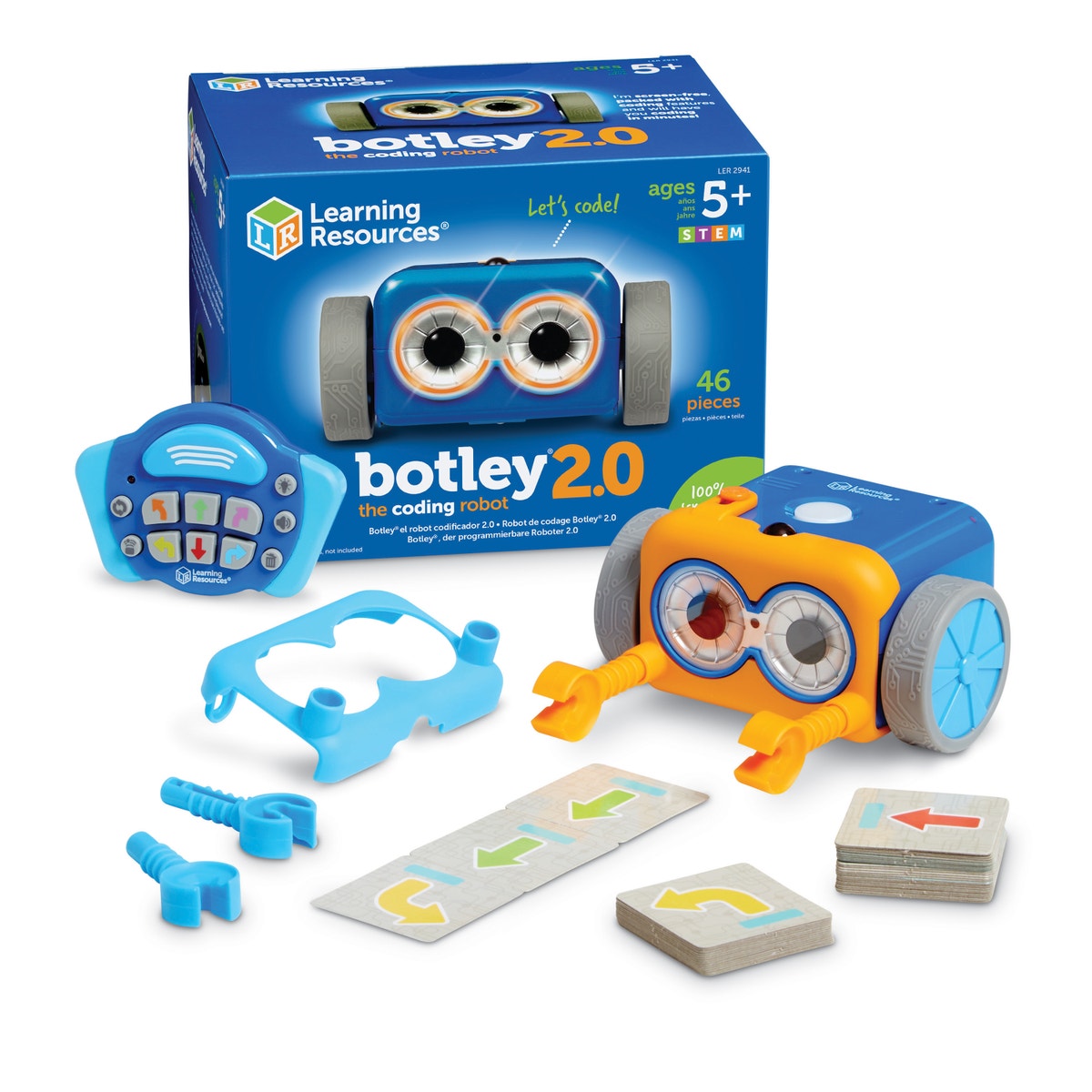
Botley 2.0 (ASIN B083T5G5ZK) is programmed with a separate remote rather than buttons on the robot itself, which is why Learning Resources labels it ages 5+: it assumes a little more fine-motor control and patience. In return you get more room to grow: six-directional movement, 45-degree turns, looping, up to about 150 programming steps, and object detection that unlocks simple if/then logic ("if Botley senses a wall, then turn"). The price tier is about $80-90.
That higher ceiling is the reason to pay more. A five-to-seven-year-old can keep finding new challenges for months instead of mastering it in an afternoon. The honest trade-offs, again from parent reviews, are occasional motor or wheel wear under heavy use and a remote that drains its AAA batteries with regular play. Neither is universal, but check the return window and keep a set of rechargeable AAAs on hand.
How do the two compare side by side?
| Code & Go Robot Mouse | Botley 2.0 | |
|---|---|---|
| Manufacturer age | 4+ | 5+ |
| Screen required | No | No |
| Programming | Buttons on the robot + cards | Handheld remote (infrared) |
| Concepts | Sequencing, directionality | + object detection, basic if/then, loops |
| Max steps | ~8-10 reliable | up to ~150 |
| Price tier | ~$35-50 | ~$80-90 |
| Reported weak spot | Path drift on long sequences | Motor wear / remote battery drain |
Want an even lower age gate? Wooden, Montessori-leaning options like Cubetto (ASIN B0D3M5K1GM, ages 3+) program with physical blocks instead of buttons, at a premium of around $100.
What should you check before buying for a toddler?
Both robots include small parts (cards, tiles, battery covers) and therefore carry the standard warning: "CHOKING HAZARD — Small parts. Not for children under 3 years." That label is not boilerplate; it reflects the CPSC small-parts rule (16 CFR 1501) and the mandatory US toy-safety standard, ASTM F963. If there is a child under 3 in the home, treat the box label as binding and store loose tiles out of reach.
Batteries deserve a second look. Botley 2.0 uses AAA cells that an adult installs; the current Code & Go set is USB-rechargeable, which removes loose-battery handling entirely. As of writing there were no active CPSC recalls for either product, but recall status is live, so check CPSC.gov/Recalls before you buy.
Where do these fit in a longer STEM path?
Think of both robots as the first rung, not the whole ladder. They introduce the logic; they do not carry a child through grade school. By ages 7-8 most kids are ready for richer kits. Our guide to the best STEM toys for 6-to-8-year-olds covers the next tier, and for hands-on electronics the Makey Makey vs micro:bit comparison is a natural step up. Older, more ambitious builders eventually move toward programmable robotics like LEGO SPIKE Prime. Buying a preschool robot with that arc in mind keeps the purchase honest: you are paying for one or two good years, not a forever toy. For families with an iPad already in the house, our Osmo Coding Awbie vs Coding Jam guide covers a tablet-based alternative that starts kids at age 5 with tangible blocks instead of a standalone robot.
So which one should you buy?
- Buy the Code & Go Robot Mouse if your child is 4-5, you want the simplest possible start, or budget is the priority. It nails sequencing without overwhelming a younger coder.
- Buy Botley 2.0 if your child is 5-7, already understands "first this, then that," and you want object detection and if/then logic to keep them engaged longer.
If you are buying a gift and genuinely cannot tell, default to the Code & Go Mouse: it costs less, starts younger, and a child who outgrows it has lost the least. The more capable Botley 2.0 is the better pick only when the child is clearly ready for it.
Sources
- CPSC — Small Parts for Toys and Children's Products (16 CFR 1501)
- CPSC — ASTM F963 toy safety chart
- American Academy of Pediatrics — HealthyChildren.org (screen media guidance)
- Computational thinking in preschoolers via educational robotics (NIH/PMC)
- NGSS — K-2 Engineering Design (K-2-ETS1)
- CPSC Recalls database