programming-toys · ages 10-14
micro:bit vs Arduino Starter Kit for a 12-Year-Old (2026): Which to Buy First?
micro:bit vs an Arduino starter kit for a 12-year-old: which to buy first. We rank the BBC micro:bit v2 against an Elegoo Arduino kit by learning curve and kid profile.
Published 2026-06-07 · 9 min read
Amazon Associates disclosure
As an Amazon Associate, I earn from qualifying purchases. The price you pay is the same. This guide is based on manufacturer specifications, published independent reviews, and verified-buyer feedback, not hands-on testing.
TL;DR
- The BBC micro:bit v2 (Go) (~$25-35) is the better first board for a total beginner: built-in sensors, no wiring, and coding that starts in MakeCode blocks and toggles to Python. The micro:bit Educational Foundation designs it for ages 8+ (Python 11+).
- The Elegoo UNO R3 starter kit (~$57) is 200+ parts and a breadboard, with Arduino C/C++ from line one. Elegoo labels it 12+. Best for a kid who already tinkers and wants to know how circuits physically work.
- Same age, opposite kits. New-to-coding 12-year-old: micro:bit. Already-tinkering 12-year-old who wants real electronics: Elegoo Arduino. The "best" depends on the kid, not the spec sheet.
As an Amazon Associate, I earn from qualifying purchases made through product links in this review. This does not affect the price you pay. This comparison is based on manufacturer specs, published expert reviews, and safety standards, not a personal hands-on test.
Two kits keep coming up when a parent searches for a 12-year-old's first "learn to code and electronics" gift. One is a tiny board with the sensors already inside. The other is a fat box of loose parts and a breadboard. They look like rivals at the same price-ish point, but they ask different things of your kid. I went through the manufacturer specs and the published expert reviews to sort out which 12-year-old each one actually fits.
What do you actually get in each box?
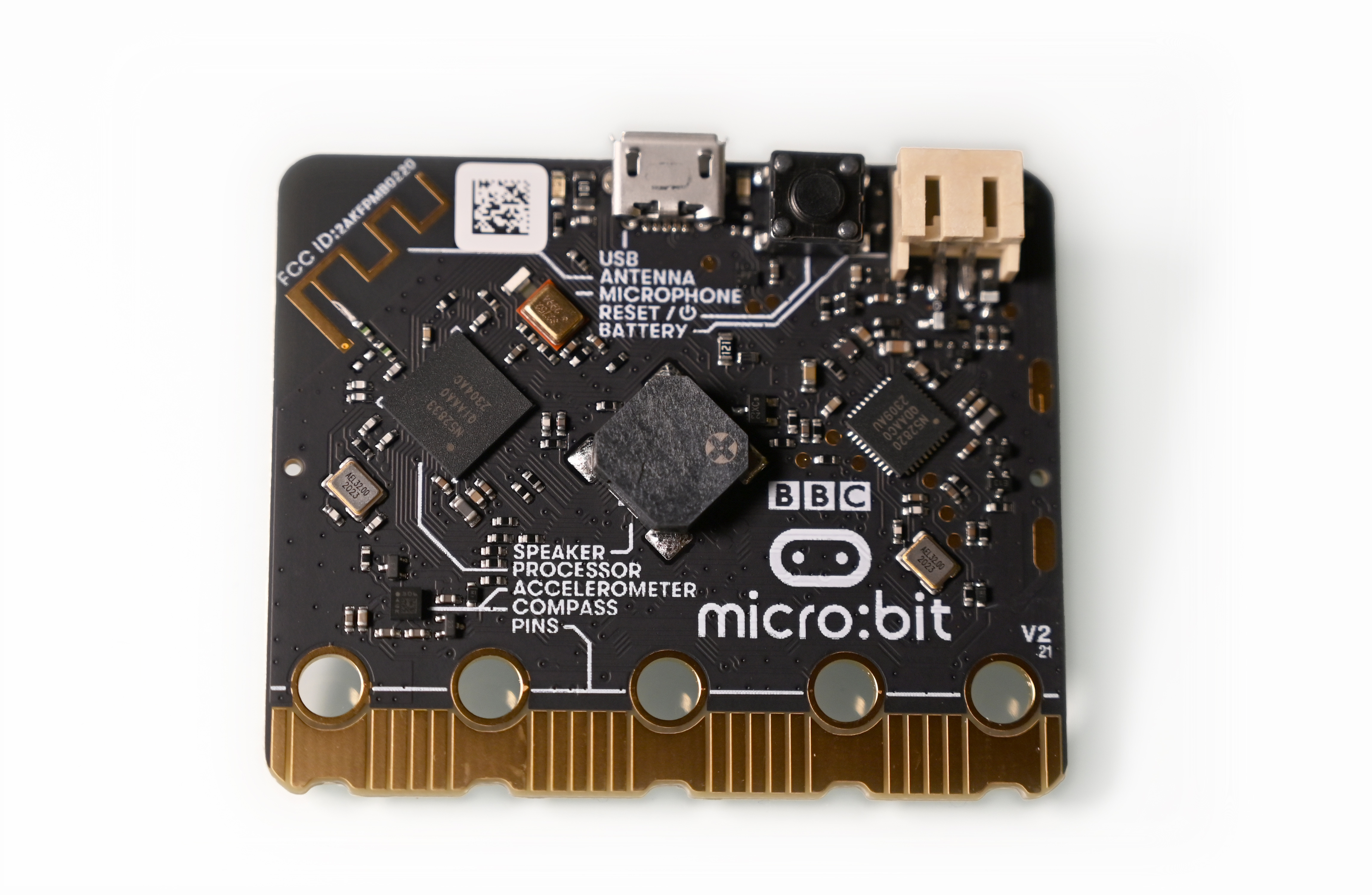
The BBC micro:bit v2 is a tiny programmable computer with everything built in. The board carries a 5×5 LED display, two buttons, a touch logo, a microphone, a speaker, and an accelerometer, and it can sense and measure light, temperature, sound, movement, and magnetism without a single wire. The Go bundle (ASIN B0BP1J72RR) adds a micro USB cable and a AAA battery holder, so after you program it on a computer the board runs on its own.
The Elegoo UNO R3 "Most Complete" kit is the opposite philosophy in a box. It's a solderless breadboard plus 200+ components, 63 kinds in all: the UNO R3 board, LEDs, resistors, an LCD, sensors, motors, and a fistful of jumper wires. There's a free PDF with 30+ lessons. Nothing is wired for you. The kit's whole job is to make a kid build circuits by hand.
That single difference drives everything below. One board hands your kid working sensors and asks "now what do you want to code?" The other hands them parts and asks "now go wire it up."
Which one is gentler for a total beginner?
The micro:bit, clearly. A 12-year-old who has never coded opens MakeCode, drags a few blocks, and the LED grid scrolls their name within minutes. No syntax to mistype, no circuit to wire wrong. When they're ready, the same editor toggles those blocks straight to Python, and the lessons map to CSTA K-12 computer-science standards. The micro:bit Educational Foundation pegs the board at ages 8+ for blocks and 11+ for Python, so a 12-year-old lands right in its sweet spot with room to grow.
The Elegoo kit starts harder on purpose. There's no block mode. A learner types Arduino C/C++ from the first project and wires the breadboard by hand. That's genuine engineering practice, but it's a steeper first step. One review of the platform notes it "may take some getting used to initially", which is exactly why Elegoo labels the kit 12+ rather than 8+.
So the beginner question comes down to frustration tolerance. A first-timer gets quick, confidence-building wins on the micro:bit. A 12-year-old who already likes figuring things out can stomach Arduino's deeper start.
Which one actually teaches electronics?
Here the verdict flips. The micro:bit hides the wiring. Its sensors talk to the code through a tidy interface, so your kid programs clever behavior without ever learning what a resistor does. Great for coding logic, light on electronics fundamentals.
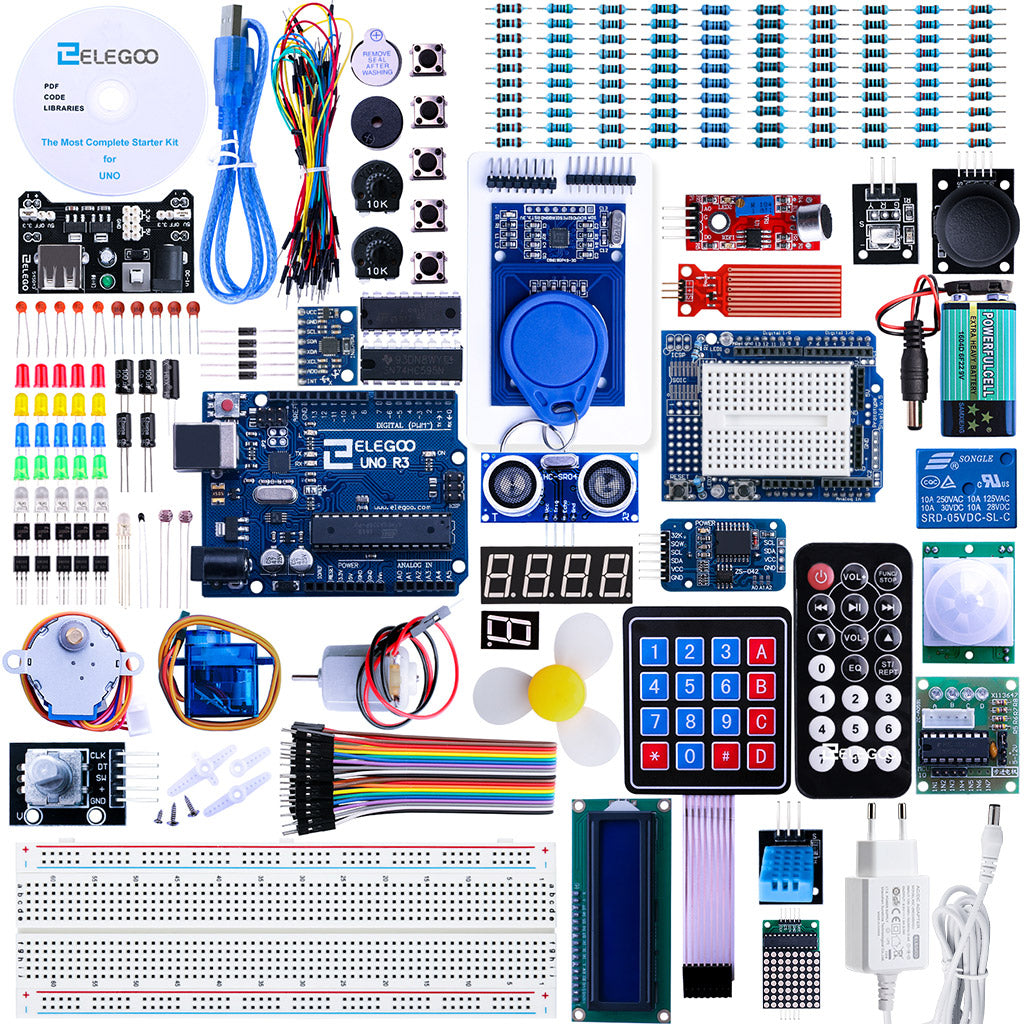
The Elegoo kit is the far better electronics teacher, and it isn't close. Building on a breadboard forces a 12-year-old to understand how a circuit closes, why a resistor matters, and which pin reads which signal. The 30+ guided lessons walk through real wiring, not abstractions. If your kid is curious about how the hardware works, or is leaning toward electrical engineering someday, this is the stronger foundation.
Picture the same idea on each kit. On the micro:bit, a kid writes a few blocks and the board reacts to a shake or a clap, sensor already inside. On the Elegoo kit, that same kid wires a light sensor to the breadboard, connects it to the right pin, adds a resistor, and writes the C code to read the voltage. The micro:bit result lands in five minutes. The Elegoo result teaches more about why it works. Neither is wrong. They simply pay off on different timelines, and that timeline is the real thing you're choosing.
What happens when a 12-year-old's build doesn't work?
Every kit eventually produces a build that fails. The difference is whether the failure is visible.
On the Elegoo Arduino kit, a wrong wire is silent. A backwards LED or a jumper in the wrong row just doesn't light, with no error on screen. Your kid has to trace the breadboard by hand and find the mistake. That diagnosis is the actual learning, and it's also the wall that stops an impatient beginner cold.
On the micro:bit, the hardware can't be miswired because the sensors are built in, so failures hide in the code instead. A program flashes fine but the LED pattern is wrong because of a logic bug the editor doesn't flag. Common Sense Education also flags a real snag: the program must be downloaded to the device each time and connecting via Bluetooth on the apps can be challenging. Different failure mode, similar lesson — but the micro:bit's is usually a software fix, not a hunt through a tangle of wires.
Match that to your kid. A child who likes puzzles will enjoy tracing an Elegoo circuit. One who gives up fast does better with the micro:bit's tidier, code-only debugging.
How do they compare head-to-head?
Here's the at-a-glance matrix. The nuance lives in the prose above; the cells just show where each kit lands.
| Criterion | BBC micro:bit v2 (Go) | Elegoo UNO R3 starter kit |
|---|---|---|
| Maker age label | 8+ (Python 11+) | 12+ |
| Price tier | ~$25-35 | ~$57 |
| Coding entry | MakeCode blocks → 1-click Python | Arduino C/C++ from line one |
| Wiring / breadboard | None — sensors built in | Yes — hand-wire every project |
| Sensors | Built in (motion, light, temp, sound) | Loose parts you wire yourself |
| Time to first win | Minutes | 1-3 hr per project |
| Teaches raw electronics | Lightly | Deeply |
The price gap is smaller than it looks and points in the kit's favor: the micro:bit Go is cheaper and faster to a first win, while the Elegoo kit costs more and asks for more patience. You're paying the extra ~$25 (and the extra hours) for hands-on circuit depth, not for a better coding intro.
How safe are these for a 12-year-old (and a toddler in the house)?
Both kits have clean records. A search of the CPSC recalls database shows no active recalls for the BBC micro:bit or the Elegoo UNO R3 starter kit as of June 2026. The safety point that matters is small parts. The bare micro:bit board, and the Elegoo kit's jumper wires, sensors, and loose components, are under 1.25 inches, which the CPSC's small-parts rule (16 CFR Part 1501) treats as a choking hazard for children under 3.
A 12-year-old is well clear of that, but a younger sibling isn't. Treat the 8+ and 12+ labels as binding for the house, not just the buyer, and store kits up high if there's a toddler around. The micro:bit Go also ships with a AAA battery holder; CPSC toy-safety guidance calls for battery compartments to be secured against small children, so check that the holder closes firmly.
What if you're between these and something simpler or pricier?
If your 12-year-old isn't ready to write code at all and you want pure invention play first, a zero-code board is the softer landing — our Makey Makey vs micro:bit guide covers that step and the jump up to the micro:bit. And if the goal is really a robot rather than circuits, an Arduino kit isn't the shortest path; our Makeblock mBot Neo vs Elegoo UNO R3 comparison weighs a build-it-yourself robot against this exact Elegoo kit.
The verdict — our pick
Bottom line: For a 12-year-old beginner, the BBC micro:bit v2 (Go) is the pick (4.5/5) — the best first board for a 12-year-old beginner: block-to-Python coding, built-in sensors, no wiring. Buy the Elegoo Arduino kit instead only if your kid already tinkers and wants real circuits.
For a 12-year-old who is new to coding, get the BBC micro:bit v2 Go Kit. It removes the syntax barrier with MakeCode blocks, grows into Python, needs no wiring, and aligns with real classroom CS standards. It's the lower-regret first buy and it stays useful for years.
For a 12-year-old who is already tinkering and wants to understand electronics from the ground up, get the Elegoo UNO R3 Most Complete kit. The 200+ parts and hand-wired breadboard teach circuit fundamentals the micro:bit quietly hides, and Arduino C/C++ is a genuine head start toward engineering.
Still not sure which kid you have? Ask one question: does your 12-year-old want to make a board do clever things right now, or understand how the electronics actually work? The honest answer points straight at the kit.