electronic-learning · ages 3-9
LeapFrog vs VTech: Which Kids' Learning Tablet Should You Buy? (2026)
LeapFrog and VTech dominate the kids' learning-tablet aisle, and there's a twist most buying guides miss: they're the same company.
Published 2026-06-02 · 8 min read
Amazon Associates disclosure
As an Amazon Associate, I earn from qualifying purchases. The price you pay is the same. This guide is based on manufacturer specifications, published independent reviews, and verified-buyer feedback, not hands-on testing.
TL;DR
- Same parent company. VTech bought LeapFrog in 2016, so this is one company selling two philosophies.
- LeapFrog teaches. The LeapPad Academy bundles a real curriculum (reading, math, science) and is the stronger learning device for ages 3 to 8.
- VTech plays and connects. The KidiCom Advance leans into camera, games, and kid-safe messaging, usually at a lower price.
- Price gap is real: the LeapPad Academy runs about $120; VTech's devices typically sit well below that.
- Whichever you pick, treat the age label as binding and cap screen time per AAP guidance.
Wait, aren't LeapFrog and VTech the same company?
Yes, and that is the fact that makes this choice easy. Walk the toy aisle and the two brands look like rivals. They are not. VTech Holdings acquired LeapFrog in 2016 in a deal worth about $72 million (LeapFrog Enterprises, Wikipedia). So you are really comparing two product lines from one owner that deliberately keeps them in separate lanes.
That pattern decides almost everything:
- LeapFrog is the curriculum brand. Its tablets are built around a structured learning program.
- VTech is the play-and-communication brand. Its devices lean on cameras, games, and kid-safe messaging.
Pick the lane that matches your child, and the specific model follows.
LeapPad Academy vs KidiCom Advance: what's the difference?
| Feature | LeapFrog LeapPad Academy | VTech KidiCom Advance 3.0 |
|---|---|---|
| Best for | Structured early learning | Play, photos, safe chat |
| Listed age | 3-8 | 4-7 |
| Headline content | LeapFrog Academy curriculum | Games, camera, KidiConnect |
| Kid-to-family messaging | No | Yes (KidiConnect) |
| Typical price | ~$120 | Usually well under $120 |
| Platform | Android-based, walled garden | VTech's own kid OS |
Specs and prices come from LeapFrog's store, the LeapPad Academy Amazon listing, and the KidiCom Advance Amazon listing. Prices move, so check the live page before you buy.
Is the LeapPad Academy worth $120?
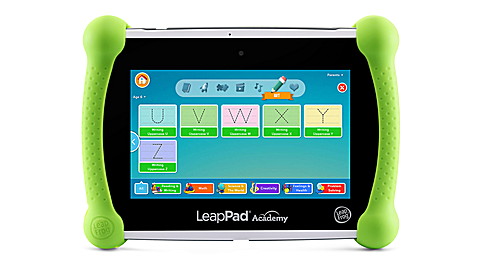
The LeapPad Academy is the closest thing in this category to a classroom in a case. It is an Android-based tablet locked inside a walled garden, and the main draw is the LeapFrog Academy program: a structured path through reading, math, science, and creative activities, with hundreds of games and videos that adjust as a child grows.
What you pay for, at roughly $120 in 2026, is that curriculum and a closed system. A preschooler cannot wander onto the open web or an app store. The silicone bumper and kickstand survive the handling a four-year-old delivers.
The honest trade-offs:
- It is the priciest pick here. The hardware is modest. The price reflects the content and the locked-down design, not raw specs.
- Kids outgrow it. By around age 8, many children find the walled garden limiting and want a more open device.
- Some content sits behind a subscription. Budget for the LeapFrog Academy program, not only the tablet.
It is the right buy when your priority is learning structure for a 3-to-7-year-old, and you want a device you do not have to police minute to minute. If your child already loves hands-on building, pairing it with a STEM kit for ages 6 to 8 keeps screen time balanced with physical play. If your child is younger and still working specifically on letter sounds, our best phonics tablets for ages 3-5 guide compares the LeapPad Academy against more hands-on, lower-screen options like Osmo's Little Genius kit.
What makes the VTech KidiCom different?
VTech's KidiCom Advance 3.0 is a different animal. It is pitched at ages 4 to 7 as a learning toy and a safe communication device. The standout feature is KidiConnect: kids exchange texts, voice, and video messages with a parent-approved contact list through a companion app. That is genuinely useful for a child who wants to "text grandma" without a real phone. It adds a 5-inch touch screen, a rotatable camera, music and video playback, and built-in games.
For an older kid who wants something closer to a phone, the KidiBuzz 3 (ages 4 to 9) pushes further toward a smart device, with a bigger app set and the same kid-safe messaging.
The trade-offs run the opposite way from LeapFrog:
- Lighter on curriculum. There are learning games, but no structured program on the level of LeapFrog Academy.
- More features means more to manage. Camera and messaging are great, and they are also more for a parent to set up and supervise.
- Lower price is the upside. The KidiCom usually lands well under the LeapPad Academy, which matters if the device might get dropped, lost, or outgrown fast.
It is the right buy when your priority is engagement and safe connection rather than a teaching curriculum, and when price sensitivity is real. For families who would rather skip screens entirely at this age, a screen-free audio player is worth a look first.
What about just buying a regular tablet?
It is a fair question, especially for older kids. Around age 7 or 8, many children start to find a toy tablet too "little kid." At that point a general tablet with strong parental controls, such as an Amazon Fire HD Kids model, often makes more sense. You get a real browser and app store behind a parent gate, plus a longer useful life.
The catch is supervision. A toy tablet does the gatekeeping for you. A real tablet hands that job back to the parent, so you are trading a walled garden for flexibility. For a 3-to-6-year-old, the walled garden usually wins. For a 7-plus child who is ready for more, the general tablet usually does. There is no need to buy a learning tablet "to last," because most kids move on from it well before it wears out.
Which one will my kid outgrow first?
This is worth thinking about before you spend $120, because the two devices have different runways. The LeapPad Academy is listed for ages 3 to 8, a five-year window, and its curriculum keeps adding harder material as a child levels up. The KidiCom is listed for ages 4 to 7, a tighter window aimed squarely at the early-elementary sweet spot.
In practice, most kids drift away from any toy tablet around age 8, once they want a real device with a proper browser and their friends' apps. That is normal, and it is the main reason not to overspend "to last." A cheaper device that nails two or three good years is often the smarter buy than a premium one your child abandons at the same age anyway.
If resale matters, both brands hold value reasonably well secondhand, partly because the hardware is built to take a beating. A clean used unit is also a low-risk way to test whether your child takes to a tablet at all before paying full price.
How much screen time is okay?
A learning tablet is still a screen. The American Academy of Pediatrics advises avoiding screen media, beyond video chat, for children under about 18 months, and keeping it limited and high quality for ages 2 to 5. A "learning" label does not exempt a device from that. Use the built-in time limits on both brands, and keep the tablet a part of the day rather than the center of it.
On physical safety, hold the box age grade as binding. Toys sold in the U.S. must meet the mandatory ASTM F963 toy-safety standard, and accessories like styluses count as small parts, so keep them away from children under 3 (CPSC small-parts rule). Recall status changes over time, so it is worth a quick check at CPSC.gov/Recalls before buying any electronic toy.
So which should you buy?
Bottom line: Buy the LeapPad Academy if you want a structured teaching tablet for a 3-to-7-year-old and the ~$120 is worth the curriculum. Buy the VTech KidiCom Advance if you want a cheaper, play-first device with kid-safe messaging and you are happy to add the learning structure yourself.
Because both brands share an owner, you are not choosing between a good company and a bad one. You are choosing between curriculum and content (LeapFrog) and play and connection (VTech). Match that to the child in front of you, set the screen-time limits on day one, and either lane is a reasonable place to start.
Sources
- Wikipedia — LeapFrog Enterprises (VTech acquisition, 2016)
- LeapFrog — LeapPad Academy product page
- Amazon — LeapFrog LeapPad Academy
- Amazon — VTech KidiCom Advance 3.0
- VTech — KidiBuzz 3
- American Academy of Pediatrics — HealthyChildren.org screen-time guidance
- U.S. CPSC — ASTM F963 toy-safety standard and Recalls